这些动作都部署完了,需要机器能通外网么。还是说完全依赖自己推理出图片和文字
0
1
1
1
K100_AI单卡全离线部署PPT生成系统
2026-07-03 21:00:04
2758
一、引言
随着人工智能技术迅猛发展,大语言模型与多模态生成技术的深度融合正在重塑各行各业的创作范式。其中,智能演示文稿(PPT)生成作为AI办公自动化的重要方向,正经历从“模板填充”到“智能体自主创作”的根本性变革。传统PPT制作依赖人工进行资料搜集、内容组织、版式设计、图文排版等繁琐流程,一份高质量的演示文稿往往需要数天的精心打磨。而随着大模型技术的成熟,AI系统已经能够实现从需求理解、内容研究到视觉设计的全链路自动化。
本文用K100_AI单卡在全离线环境里完成PPT生成系统的部署,用到的幻灯片智能体模型是DeepPresenter-9B,该模型是由中国科学院软件研究所开源的第二代幻灯片智能体模型,是 DeepPresenter 框架微调后的 9B 参数版本。它在仅用 9B 参数的情况下,性能比肩闭源模型 GPT-5,并且是业界首个将智能体模型与完整沙箱环境一同开源的项目。用到的文生图模型是ERNIE-Image-Turbo,该模型是百度文心大模型团队于2026年4月开源的一款极致轻量、高效的文生图模型,其通过技术创新,将生成所需的推理步数从常规的50步压缩到了仅需8步,实现了在速度和画质上的优秀平衡,在单语言、简单排版的场景下表现出色,与闭源模型同属第一梯队。
二、方案设计
本方案采用“设计智能体(DeepPresenter-9B)+ 文生图模型(ERNIE-Image-Turbo)”的两模型协同架构。两个模型各司其职、通过标准化API协同工作:
1、DeepPresenter-9B作为Design Agent(同时也是Research Agent、Long Context Model),负责深度内容检索与信息组织和幻灯片HTML代码生成与设计约束管理。
2、ERNIE-Image-Turbo作为T2I Model,负责按需生成高质量配图。
DeepPresenter的核心创新在于“环境感知反思”(Environment-Grounded Reflection)机制。与传统的自我反思(依赖内部推理痕迹)不同,环境感知反思将生成过程建立在可感知的产物状态(如渲染后的幻灯片截图)之上。系统在每页幻灯片生成后,调用沙箱内浏览器将HTML代码渲染为真实图片,并基于截图进行自适应检查与迭代优化。这一机制有效解决了传统方案中“代码正确但渲染错误”的问题。
ERNIE-Image-Turbo采用单流扩散变换器(DiT)架构,通过动态掩码扩散与强化学习优化技术,将传统扩散模型所需的50步推理压缩至8步。参数规模仅8B,可在显存24GB的消费级GPU上运行。在GenEval、OneIG等多项国际基准上综合得分位居开源模型第一。
三、实施方法及代码
3.1硬件环境
本方案的硬件平台为一台H3C服务器,配置如下:
| 组件 | 规格 |
| CPU | 2×海光7490 2.7GHz 64C |
| 内存 | 16×32G DDR5 |
| GPU | 8×海光DCU 64GB K100_AI |
只需占用一张K100_AI显卡
3.2软件栈
本方案的软件栈基于Docker容器化技术构建,使用经过海光DCU适配的vLLM推理镜像:
镜像一(DeepPresenter-9B):
42.228.13.241:5000/jenkins/model_test_env/vllm:0.21.0-ubuntu22.04-dtk2604-py3.10-20260702-0235
该镜像包含vLLM 0.21推理框架、DTK 26.04、Python 3.10环境,单卡部署DeepPresenter-9B,平均每秒生成31token。
镜像二(ERNIE-Image-Turbo):
harbor.sourcefind.cn:5443/dcu/admin/base/custom:vllm0.15.1-ubuntu22.04-dtk26.04-0130-py3.10-20260220
该镜像基于vLLM 0.15.1推理框架、DTK 26.04,Python 3.10环境,单卡部署ERNIE-Image-Turbo(和DeepPresenter-9B部署在同一张K100_AI),平均12秒生成一张高清图片。
软件项目:
1、ERNIE-Image-Turbo环境部署参照https://developer.sourcefind.cn/codes/modelzoo/ernie-image_pytorch里面操作步骤,项目下载链接为:https://developer.sourcefind.cn/codes/modelzoo/ernie-image_pytorch/-/archive/main/ernie-image_pytorch-main.zip,但是需要自行为该项目编写openai兼容API接口,自编代码如下:
root@lswa1:/opt/models/ernie-image_pytorch-main# cat run-web-turbo-OpenAI.py
import os
os.environ["HIP_VISIBLE_DEVICES"] = "7"
import torch
import base64
import io
from flask import Flask, request, jsonify
from flask_cors import CORS
from modelscope import ErnieImagePipeline

# ===================== 全局只加载一次模型 =====================
torch.set_float32_matmul_precision('high')
torch.backends.cudnn.benchmark = True
torch.backends.cuda.enable_mem_efficient_sdp(True)

print("正在加载 ERNIE-Image-Turbo 模型...")
pipe = ErnieImagePipeline.from_pretrained(
    "/home/models/ERNIE-Image-Turbo",
    torch_dtype=torch.bfloat16,
).to("cuda")
print("模型加载完成。")

# 预热
with torch.no_grad():
    dummy_q = torch.randn(1, 8, 40, 64, device="cuda", dtype=torch.bfloat16)
    dummy_k = torch.randn(1, 8, 40, 64, device="cuda", dtype=torch.bfloat16)
    dummy_v = torch.randn(1, 8, 40, 64, device="cuda", dtype=torch.bfloat16)
    torch.nn.functional.scaled_dot_product_attention(dummy_q, dummy_k, dummy_v)
print("模型预热完成。")

# ===================== 生成函数 =====================
def generate_image(prompt, height, width, steps, guidance_scale, use_pe):
    with torch.no_grad():
        image = pipe(
            prompt=prompt,
            height=height,
            width=width,
            num_inference_steps=steps,
            guidance_scale=guidance_scale,
            use_pe=use_pe
        ).images[0]
    return image

# ===================== Flask API 服务 =====================
app = Flask(__name__)
CORS(app)

@app.route('/v1/images/generations', methods=['POST'])
def images_generations():
    data = request.get_json()
    print(f"[DEBUG] Received data: {data}")

    if not data:
        return jsonify({"error": "Missing request body"}), 400

    prompt = data.get('prompt')
    if not prompt:
        return jsonify({"error": "Missing 'prompt' field"}), 400

    # 优先使用 size 字段(格式如 "1920x1088"),否则使用 width 和 height
    size_str = data.get('size')
    if size_str and isinstance(size_str, str) and 'x' in size_str:
        try:
            w_str, h_str = size_str.split('x')
            width = int(w_str)
            height = int(h_str)
            print(f"[DEBUG] Parsed from size: width={width}, height={height}")
        except ValueError:
            return jsonify({"error": f"Invalid size format: {size_str}"}), 400
    else:
        width = data.get('width', 848)
        height = data.get('height', 1264)
        print(f"[DEBUG] Using width/height: width={width}, height={height}")

    # 确保整数
    try:
        width = int(width)
        height = int(height)
    except (TypeError, ValueError):
        return jsonify({"error": f"Invalid width/height: {width}, {height}"}), 400

    # ========== 性能优化:限制最大分辨率 ==========
    max_dim = 1024          # 可调整为 768 或 1280 平衡速度与画质
    if width > max_dim or height > max_dim:
        scale = max_dim / max(width, height)
        width = int(width * scale)
        height = int(height * scale)
        print(f"[DEBUG] Scaled down to max dim {max_dim}: {width}x{height}")

    # 对齐到 16 的倍数(模型要求)
    orig_w, orig_h = width, height
    width = (width // 16) * 16
    height = (height // 16) * 16
    if width < 16:
        width = 16
    if height < 16:
        height = 16
    if (orig_w, orig_h) != (width, height):
        print(f"[DEBUG] Aligned dimensions: ({orig_w},{orig_h}) -> ({width},{height})")
    else:
        print(f"[DEBUG] Dimensions already multiple of 16: {width}x{height}")

    # ========== 性能优化:降低步数、禁用提示词增强 ==========
    steps = data.get('steps', 4)               # 默认步数从 8 改为 4
    if 'num_inference_steps' in data:
        steps = data['num_inference_steps']
    guidance_scale = data.get('guidance_scale', 1.0)
    use_pe = data.get('use_pe', False)         # 默认禁用提示词增强,加速推理

    try:
        pil_image = generate_image(prompt, height, width, steps, guidance_scale, use_pe)
        buffered = io.BytesIO()
        pil_image.save(buffered, format="PNG")
        img_base64 = base64.b64encode(buffered.getvalue()).decode('utf-8')

        response = {
            "data": [
                {
                    "b64_json": img_base64,
                    "url": f"data:image/png;base64,{img_base64}"
                }
            ]
        }
        return jsonify(response)
    except Exception as e:
        print(f"[ERROR] {e}")
        return jsonify({"error": str(e)}), 500

@app.route('/v1/models', methods=['GET'])
def list_models():
    return jsonify({
        "data": [
            {"id": "ERNIE-Image-Turbo", "object": "model"}
        ]
    })

@app.route('/health', methods=['GET'])
def health():
    return jsonify({"status": "ok"})

if __name__ == "__main__":
app.run(host="0.0.0.0", port=5000, threaded=False)2、PPTAgent下载链接为:https://github.com/icip-cas/PPTAgent/archive/refs/heads/main.zip,安装好该项目的依赖库之后,修改其配置文件如下:
root@lswa1:/opt/models/PPTAgent-main# cat deeppresenter/config.yaml
context_folding: true

design_agent: &id001
  api_key: '123456'
  max_tool_calls: 20
  base_url: http://192.168.222.65:8083/v1
  model: DeepPresenter-9B
  design_constraints:
    max_bullets_per_slide: 6
    min_bottom_margin: 0.6
  system_prompt_extra: |
    # ⛔ FATAL RULES – VIOLATION = SLIDE REJECTION ⛔
    You are generating HTML slides that will be converted to PowerPoint via a strict validator. **Any rule violation makes the entire slide fail.** Follow every rule exactly.

    ## ABSOLUTELY FORBIDDEN – WILL CAUSE IMMEDIATE REJECTION:
    1. **Headers (`<h1>` to `<h6>`)** MUST NEVER have any of these CSS properties:
       - `border` (including `border-*`, `outline`)
       - `background` (including `background-color`, `background-image`)
       - `box-shadow`
       - `margin` (use `padding` on the parent container instead)
       - `padding` (use `padding` on the parent container instead)
       → **If you need visual decoration (border, background, shadow) around a heading, wrap the heading in a `<div>` and apply those styles to that `<div>` only.**
       → **Example (WRONG):** `<h2 style="border-bottom: 2px solid red;">Title</h2>` ❌
       → **Example (CORRECT):** `<div style="border-bottom: 2px solid red;"><h2>Title</h2></div>` ✅
    2. **Naked text** inside `<div>`, `<section>`, or any block container is NOT allowed. All text must be enclosed in `<p>`, `<h1>`–`<h6>`, `<ul>`, or `<ol>`.
    3. **Inline elements** (`<b>`, `<strong>`, `<span>`, `<a>`) must NOT have `margin`, `padding`, or `border`. Spacing must be applied to the outer block-level parent.
    4. **Manual bullet symbols** (e.g., •, -, *) are forbidden. Always use `<ul><li>...</li></ul>`.
    5. **Overflow is prohibited** – both horizontally and vertically. The slide container has a fixed height (100% of 7.5 inches). All content must fit within with at least **0.5 inch (≈36pt) of bottom padding**.
    6. **Image generation** – `width` and `height` must be multiples of 16 (e.g., 1360×768, 1376×768). Never use odd numbers like 1366.

    ## MANDATORY LAYOUT RULES (to prevent overflow):
    - Root container: `<div class="slide">` with `style="display:flex; flex-direction:column; height:100%; width:100%;"`.
    - Main content area: use `flex:1;` and set `padding-bottom: 36pt;` (or larger) to ensure bottom margin.
    - Limit bullet points to **6 per slide** and keep text concise. If content is dense, reduce font size (e.g., use `font-size: 14pt` instead of 18pt) or line-height.
    - Use relative units (`%`, `vw`, `em`) for widths and margins to avoid horizontal overflow. Avoid fixed pixel widths that may exceed container.
    - For multi‑column or grid layouts, use `display:flex; flex-wrap:wrap;` with appropriate `gap` and ensure total width ≤ 100%.

    ## SELF‑CHECK (run mentally before submitting each slide):
    1. **Scan every `<h1>`–`<h6>`** – confirm they have **zero** `border`, `background`, `box-shadow`, `margin`, `padding`. If any exist, remove them immediately and move styling to a wrapping `<div>`.
    2. Check every `<div>` – ensure no raw text is left unwrapped.
    3. Verify that the bottom‑most element is at least 36pt above the slide bottom (use `padding-bottom` on the flex child).
    4. Temporarily set `overflow: visible` on the slide to visually check for any content spilling outside; if it spills, reduce content or font sizes.
    5. Ensure no list is manually bulleted – all lists use `<ul>`.

    ## REMINDER – Existing guidelines still apply:
    - All styles must be inline or inside `<style>`.
    - Use flex/grid for layout.
    - The validator is unforgiving – **double‑check every rule** before finalizing a slide.

long_context_model: *id001
research_agent: *id001

t2i_model:
  base_url: "http://192.168.222.65:5000/v1"
  model: "ERNIE-Image-Turbo"
  api_key: "not-needed"

offline_mode: true
vision_model: *id001
3.3模型下载与准备
1、DeepPresenter-9B(幻灯片设计模型):
下载链接:https://modelscope.cn/models/forceless/DeepPresenter-9B/files
该模型针对幻灯片生成场景进行了监督微调
2、ERNIE-Image-Turbo(文生图模型):
下载链接:https://modelscope.cn/models/PaddlePaddle/ERNIE-Image-Turbo/files
8B参数,支持8步推理快速生成
3.4 模型启动参数
root@lswa1:/opt/models# cat dmx_DeepPresenter-9B.sh
#!/bin/bash
export VLLM_SPEC_DECODE_EAGER=1
export VLLM_MLA_DISABLE=0
export VLLM_USE_FLASH_MLA=1
export VLLM_RPC_TIMEOUT=1800000
export HIP_VISIBLE_DEVICES=7
export ALLREDUCE_STREAM_WITH_COMPUTE=1
# 海光CPU绑定核,通过hy-smi --showtopo参考numa节点
export VLLM_NUMA_BIND=1
export VLLM_RANK0_NUMA=0
export VLLM_RANK1_NUMA=0
export VLLM_RANK2_NUMA=0
export VLLM_RANK3_NUMA=0
export VLLM_RANK4_NUMA=0
export VLLM_RANK5_NUMA=0
export VLLM_RANK6_NUMA=0
export VLLM_RANK7_NUMA=0
export NCCL_MAX_NCHANNELS=16
export NCCL_MIN_NCHANNELS=16
#export TRITON_HIP_CLANG_PATH=/opt/dtk-26.04-DCC2602-0317/llvm/bin/clang
#export ROCM_PATH=/opt/dtk-26.04-DCC2602-0317
export PATH=$ROCM_PATH/llvm/bin:$PATH

vllm serve "/home/models/DeepPresenter-9B" \
    --gpu-memory-utilization 0.4 \
    --port 8083 \
    --max-model-len 32768 \
    --max-num-seqs 32 \
    --served-model-name DeepPresenter-9B \
    --tensor-parallel-size 1 \
    --enable-auto-tool-choice \
    --tool-call-parser qwen3_xml \
    --trust-remote-code \
    --enable-prefix-caching \
    --enable-chunked-prefill
root@lswa1:/opt/models#
启动参数一定要注意设置:--tool-call-parser qwen3_xml
四、运行测试
1、启动ERNIE-Image-Turbo模型,用前面自编的openai兼容API接口程序加载ERNIE-Image-Turbo模型,如下:
root@lswa1:/opt/models# docker exec -it erinie-image-new bash
root@lswa1:/workspace# cd /home/models/ernie-image_pytorch-main
root@lswa1:/home/models/ernie-image_pytorch-main# nohup python run-web-turbo-OpenAI.py &
[1] 57
root@lswa1:/home/models/ernie-image_pytorch-main# nohup: ignoring input and appending output to 'nohup.out'2、启动DeepPresenter-9B,如下:
root@lswa1:/opt/models# docker exec -it vllm0.21-new bash
root@lswa1:/# cd /home/models/
root@lswa1:/home/models# nohup ./dmx_DeepPresenter-9B.sh &
[1] 232
root@lswa1:/home/models# nohup: ignoring input and appending output to 'nohup.out'3、启动PPTagent项目,如下:
root@lswa1:/opt/models# docker exec -it erinie-image-new bash
root@lswa1:/workspace# cd /home/models/PPTAgent-main
root@lswa1:/home/models/PPTAgent-main# source .venv/bin/activate
(pptagent) root@lswa1:/home/models/PPTAgent-main# python webui.py
/opt/models/PPTAgent-main/.venv/lib/python3.11/site-packages/requests/__init__.py:113: RequestsDependencyWarning: urllib3 (2.6.3) or chardet (7.0.1)/charset_normalizer (3.4.4) doesn't match a supported version!
  warnings.warn(
/home/models/PPTAgent-main/webui.py:107: DeprecationWarning: The 'theme' parameter in the Blocks constructor will be removed in Gradio 6.0. You will need to pass 'theme' to Blocks.launch() instead.
  with gr.Blocks(
/home/models/PPTAgent-main/webui.py:107: DeprecationWarning: The 'css' parameter in the Blocks constructor will be removed in Gradio 6.0. You will need to pass 'css' to Blocks.launch() instead.
  with gr.Blocks(
/home/models/PPTAgent-main/webui.py:119: DeprecationWarning: The default value of 'allow_tags' in gr.Chatbot will be changed from False to True in Gradio 6.0. You will need to explicitly set allow_tags=False if you want to disable tags in your chatbot.
  chatbot = gr.Chatbot(
Please visit http://localhost:7861
* Running on local URL:  http://0.0.0.0:7861
* To create a public link, set `share=True` in `launch()`.
4、访问PPT生成系统,如下:
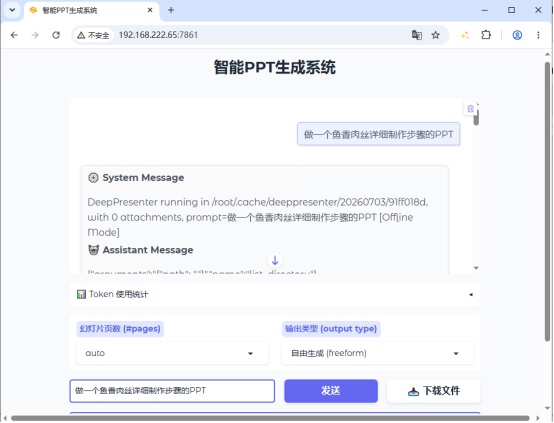
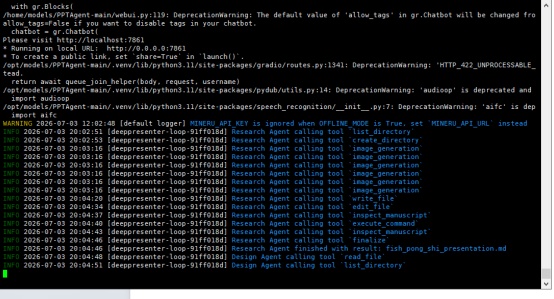
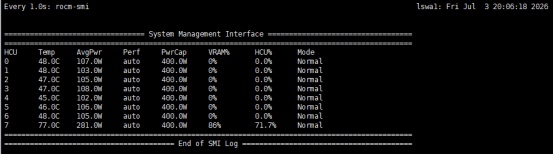
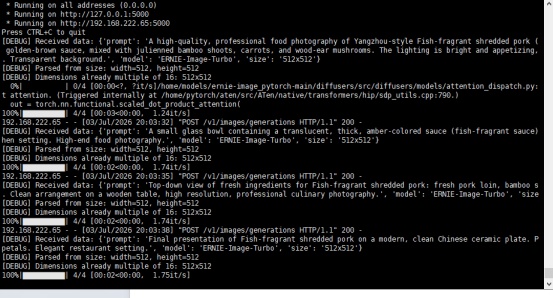
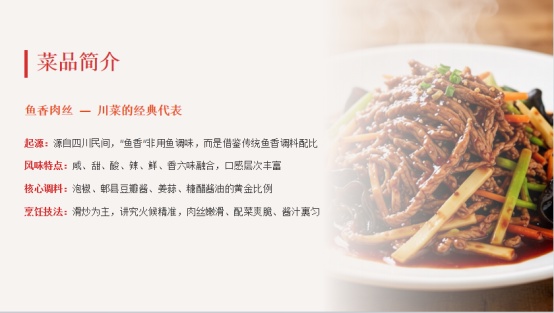
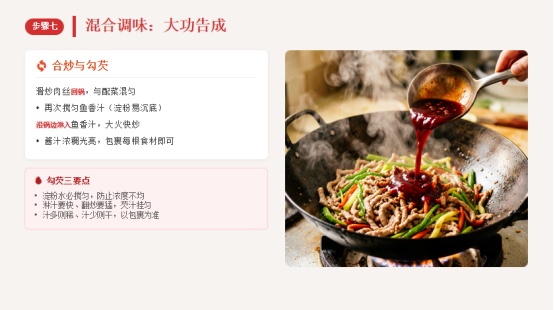
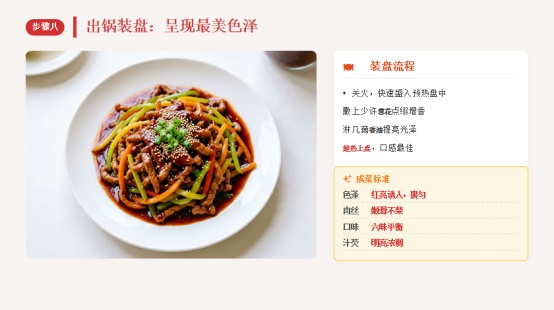
5、生成PPT的效果如下:

全部评论(64)
只看楼主
王
9/29

厉害!
8/11
网
你好,为什么我按照https://developer.sourcefind.cn/codes/modelzoo/ernie-image_pytorch的配置执行run.py,每个图片还是要50步,然后500秒才有一张图,是哪里有什么问题吗?
7/17

感谢分享
7/7
Z
厉害,学习了
7/6
1
很好,学习了
7/6
网
厉害,学习了。
7/6
0
实用
7/6
Y
1010011010
7/5
X
加油👏
7/5
A
7/5
自
确实不错 大佬带我我
7/5
U
牛
7/5
小
向大佬学习
7/5
J
7/4
U
👍👍👍👍👍👍👍👍👍👍👍
7/4
T
学习了,期待使用
7/4
U
老同学👍👍👍👍👍👍👍👍👍👍👍
7/4
你
向大佬学习
7/4
卫
7/4
U
666顶顶顶
7/4
小
写得太好了
7/4
W
:
7/4
独
👍厉害
7/4
U
大佬
7/4
X
国产算力生态完善,需要你
7/4
周
非常感谢分享
7/4
U
用的国产卡,厉害
7/4
会
实用好用,解决问题。
7/4
B

7/4
海
大赞特赞
7/4
还
解决实际问题
7/4
D
这个一定火,好厉害。学习学习。
7/4
三
威武
7/4
U
科技赋能 务实有用
7/4
无
已学习,尽快弄到工作中去
7/4
小
实用7/3
音
膜拜大神,非常不错
7/3
飞
膜拜大神,学习了
7/3
A
7/3
U
学习了~太棒了!
7/3
C
期待运用
7/3
学
这是干货,能学习到有用的姿势
7/3
C
太棒了,一定要试试
7/3
小
牛逼普拉斯啊
7/3
一
太棒啦,解决大问题~!
7/3
H
非常好,全离线部署解决了内网使用PPT智能生成的难题❗
7/3
T
实用,好用,解放生产力
7/3
B
大赞特赞期待中
期待中7/3
H
太厉害了!期待使用!
7/3
小
实现了向科技要生产力,新质战斗力。
7/3
Y
非常实用!兼简直解决了大问题
7/3
H
太棒了
7/3
M
看起来非常不错,可以解决ppt制作这个大问题,明天我就来试试!
7/3
瓜
期待运用
7/3
没有更多内容了
--
楼主

0 点赞
0 帖子
楼主热帖
 暂无数据
暂无数据常见问题新帖
暂无数据