太厉害了
0
2
0
0
K100_AI两卡全离线部署 音视频说话人角色确认转录系统
2026-07-12 19:45:35
148
一、引言
在数字化办公与媒体内容生产领域,从会议录音、访谈视频、培训课程等多媒体文件中高效、准确地提取文字记录,并区分不同说话人,已成为一项基础且迫切的需求。传统的在线语音识别服务虽便捷,却面临数据隐私泄露、网络延迟波动、服务不可控等风险;而纯软件端到端方案往往受限于单机算力,难以在保证实时性的同时完成高精度说话人分离与长音频转写。为兼顾安全性、可控性与高性能,越来越多行业用户将目光投向全离线私有化部署方案。本文提出一种基于K100 AI加速卡双卡全离线部署的音视频说话人角色确认转录系统,利用国产高算力硬件与先进的开源多模态模型,在完全断网环境下实现从音视频文件上传到带时间戳、带说话人标签的转写文本一站式处理。
K100 AI加速卡单卡即可提供充沛的INT8/FP16算力,双卡协同更能通过张量并行或流水线并行大幅提升长序列推理速度,特别适合处理高时长、多轮对话的复杂音频。本系统选用SoulX-Transcriber多模态大模型,该模型原生集成说话人日志和自动语音识别能力,能够以极简的prompt交互完成端到端“谁在什么时候说了什么”的精准解析。系统上层采用轻量级Flask Web框架搭建交互界面,底层依托vLLM高性能推理引擎驱动模型,ffmpeg统一预处理音视频流,实现从文件接收、音频转换、模型推理到结果清洗与展示的全离线闭环。用户仅需在浏览器中上传文件,数十秒至数十分钟后即可获得结构化的角色分离转写文本,全过程数据不出本机,极大保障了涉密场景下的信息安全,同时消除了云端服务的订阅成本与网络依赖,为政企会议纪要生成、媒体字幕制作、司法存证等场景提供了高性价比的一体化解决方案。
二、方案设计
系统整体采用前后端分离的B/S架构,前端页面提供文件上传入口与转写结果展示,后端负责业务调度与模型推理链路的串联。核心组件包括:Flask应用服务器、ffmpeg媒体处理工具、vLLM推理服务、SoulX-Transcriber多模态大模型,以及支撑双卡算力的底层驱动与运行时。
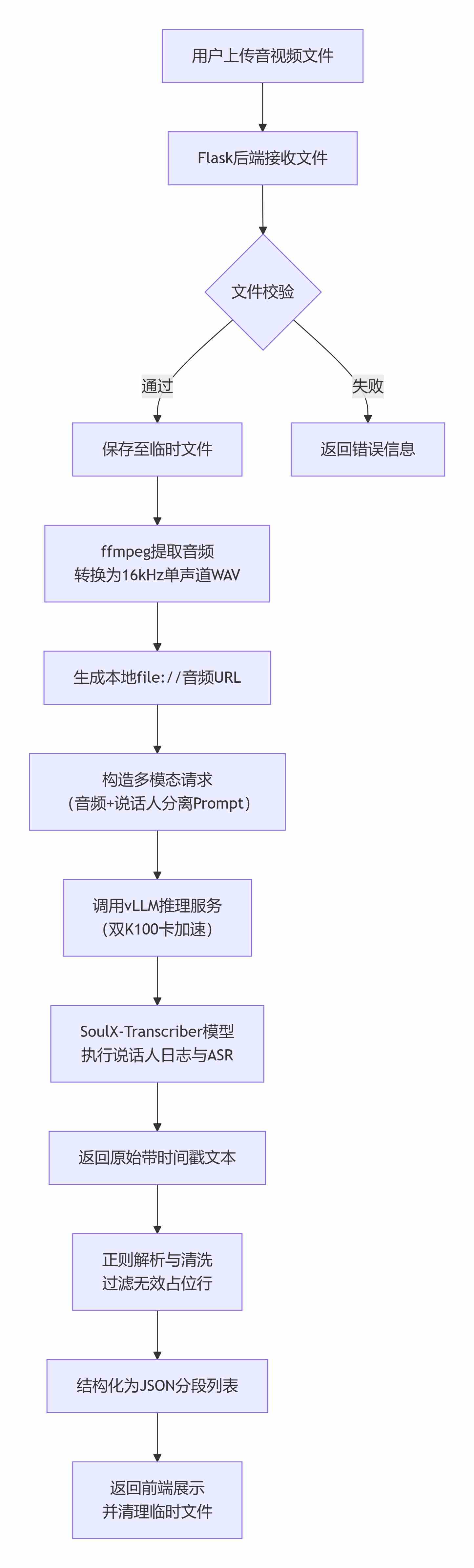
工作流程如下:用户通过浏览器将音视频文件提交至Flask后端,后端首先对文件做安全校验并保存至临时目录。随后调用ffmpeg命令行工具,忽略视频轨(-vn),将音频重采样为16kHz采样率、单声道、16bit量化的PCM WAV格式。这一标准化步骤屏蔽了输入文件编码、采样率、声道数等差异性,确保模型始终接收到符合预期的干净音频。转换完成后,Flask构造出指向该WAV文件的本地路径URL(file://协议),并与精心设计的系统指令和用户提示词拼接成多模态对话请求体。提示词明确要求模型进行说话人分离与ASR,输出格式为[开始时间 → 结束时间] Speaker X: 说话内容,时间戳精确到毫秒,并禁止拆分完整语义轮次。
请求被发送至vLLM服务,该服务在双K100加速卡上以张量并行模式加载SoulX-Transcriber模型,模型接收音频数据和文本指令后,通过跨模态注意力机制同步完成声纹聚类、时间边界检测与文字转换,生成原始转写文本。Flask获得响应后,利用正则表达式解析模型输出,过滤掉模型可能产生的无效占位行(如--:--:-- --> --:--:--),提取出结构化的分段列表,包含起止时间、说话人标签和文本内容,并连同原始文本一同以JSON格式返回前端渲染。整个处理过程中产生的临时文件均在请求结束后自动清除,避免磁盘残留。
离线部署方面,vLLM服务与Flask应用均可通过systemd或容器化方式固化在本地系统,双K100卡通过NCCL等通信库高效协同,支持超过10分钟的长音频的一次性推理,端到端延迟可控制在实时率0.1以下。该方案无需任何外部网络连接,所有组件开源可控,可根据业务需求灵活调整模型温度、最大token数等参数,在精度与速度间取得平衡。
下图展示了整体数据流:
三、实施方法及代码
3.1硬件环境
本方案的硬件平台为一台H3C服务器,配置如下:
| 组件 | 规格 |
| CPU | 2×海光74902.7GHz64C |
| 内存 | 16×32GDDR5 |
| GPU | 8×海光DCU64GBK100_AI |
需占用两张K100_AI显卡
3.2软件栈
本方案的软件栈基于Docker容器化技术构建,使用经过海光DCU适配的vLLM推理镜像:
镜像(SoulX-Transcriber):
harbor.sourcefind.cn:5443/dcu/admin/base/custom:vllm0.15.1-ubuntu22.04-dtk26.04-0130-py3.10-20260220
该镜像基于vLLM0.15.1推理框架、DTK26.04,Python3.10环境,双卡部署SoulX-Transcriber多模态大模型。
软件项目:
1、SoulX-Transcriber环境部署参照https://developer.sourcefind.cn/modelzoo/list/qwen3-omni_vllm/detail?post_id=3563caba-356c-11f1-be71-0242ac150003里面操作步骤,项目下载链接为:https://developer.sourcefind.cn/codes/modelzoo/qwen3-omni_vllm/-/archive/v1.0/qwen3-omni_vllm-v1.0.zip。
2、离线音视频说话人角色确认转录系统自编程序代码如下:
app.py代码如下:
import os
import re
import tempfile
import subprocess
import requests
from flask import Flask, request, jsonify, render_template
from werkzeug.utils import secure_filename

app = Flask(__name__)
app.config['MAX_CONTENT_LENGTH'] = 500 * 1024 * 1024  # 500 MB

VLLM_URL = "http://localhost:8082/v1/chat/completions"
MODEL_NAME = "SoulX-Transcriber"


def parse_transcript(text):
    """
    解析转录文本,支持两种时间戳格式,过滤无意义的占位行。
    """
    lines = text.strip().split('\n')
    segments = []

    # 匹配 --:--:-- 后面跟着 --> 或 → 的行
    placeholder_pattern = re.compile(r'^--:--:--\s*(?:-->|→)\s*--:--:--$')

    pattern_hms = re.compile(r'\[(\d{2}:\d{2}:\d{2})\s*->\s*(\d{2}:\d{2}:\d{2})\]\s*(Speaker\d+):\s*(.*)')
    pattern_ms  = re.compile(r'\[(\d{2}:\d{2}\.\d+)\s*-->\s*(\d{2}:\d{2}\.\d+)\]\s*(Speaker\d+):\s*(.*)')
    pattern_no_time = re.compile(r'(Speaker\d+):\s*(.*)')

    for line in lines:
        line = line.strip()
        if not line:
            continue

        # 丢弃占位行
        if placeholder_pattern.match(line):
            continue

        match = pattern_hms.match(line)
        if match:
            start, end, speaker, content = match.groups()
            segments.append({'start': start, 'end': end, 'speaker': speaker, 'text': content})
            continue

        match = pattern_ms.match(line)
        if match:
            start, end, speaker, content = match.groups()
            segments.append({'start': start, 'end': end, 'speaker': speaker, 'text': content})
            continue

        match = pattern_no_time.match(line)
        if match:
            speaker, content = match.groups()
            segments.append({'start': None, 'end': None, 'speaker': speaker, 'text': content})
        else:
            segments.append({'start': None, 'end': None, 'speaker': None, 'text': line})

    return segments


@app.route('/')
def index():
    return render_template('index.html')


@app.route('/transcribe', methods=['POST'])
def transcribe():
    if 'video' not in request.files:
        return jsonify({'error': 'No video/audio file provided'}), 400

    video_file = request.files['video']
    if video_file.filename == '':
        return jsonify({'error': 'Empty filename'}), 400

    filename = secure_filename(video_file.filename)
    input_tmp = None
    wav_path = None

    try:
        # 1. 保存上传的原始文件到临时文件(保留扩展名用于 ffmpeg 识别)
        suffix = os.path.splitext(filename)[1] or '.tmp'
        input_tmp = tempfile.NamedTemporaryFile(delete=False, suffix=suffix)
        video_file.save(input_tmp.name)
        input_tmp.close()  # 关闭句柄但不删除

        # 2. 创建输出 WAV 临时文件(16kHz 单声道)
        wav_tmp = tempfile.NamedTemporaryFile(delete=False, suffix='.wav')
        wav_path = wav_tmp.name
        wav_tmp.close()

        # 3. 使用 ffmpeg 统一转成 16kHz 单声道 PCM WAV
        cmd = [
            'ffmpeg',
            '-i', input_tmp.name,
            '-vn',                    # 无视视频流(如果存在)
            '-acodec', 'pcm_s16le',
            '-ar', '16000',
            '-ac', '1',
            '-y',
            wav_path
        ]
        subprocess.run(cmd, check=True, stdout=subprocess.PIPE, stderr=subprocess.PIPE)

        # 4. 构造本地文件 URL(服务器必须能通过 file:// 访问同一路径)
        audio_file_url = f"file://{os.path.abspath(wav_path)}"

        # ---------- 使用示例中的 USER_QUERY (与原版基本一致)----------
        USER_QUERY = (
            "Task: Speaker Diarization and ASR.\n"
            "    Rules:\n"
            "    1. Identify each speaker and their spoken content with punctuation.\n"
            "    2. Format each turn as: [start_time --> end_time] Speaker X: text\n"
            "    3. Timestamps should be precise to the millisecond (e.g., 00:00:01.234).\n"
            "    4. Do NOT split an utterance to avoid overlap — keep each speaker turn complete.\n"
            "    5. Handle overlapping speech by showing concurrent turns with their own time ranges.\n"
            "    6. Output only the formatted results. No preamble, no explanation.\n"
            "<audio>"
        )

        payload = {
            "model": MODEL_NAME,
            "messages": [
                {
                    "role": "system",
                    "content": "You are an expert in speaker diarization and automatic speech recognition."
                },
                {
                    "role": "user",
                    "content": [
                        {"type": "audio_url", "audio_url": {"url": audio_file_url}},
                        {"type": "text", "text": USER_QUERY}
                    ]
                }
            ],
            "temperature": 0.2,
            "top_p": 0.9,
            "top_k": -1,
            "max_tokens": 64000
        }

        response = requests.post(VLLM_URL, json=payload, timeout=600)
        response.raise_for_status()
        result = response.json()
        content = result['choices'][0]['message']['content']
        segments = parse_transcript(content)

        return jsonify({
            'success': True,
            'segments': segments,
            'raw_text': content
        })

    except subprocess.CalledProcessError as e:
        error_msg = e.stderr.decode() if e.stderr else 'ffmpeg failed'
        return jsonify({'error': f'Audio conversion failed: {error_msg}'}), 500
    except Exception as e:
        return jsonify({'error': str(e)}), 500
    finally:
        # 清理临时文件
        if input_tmp and os.path.exists(input_tmp.name):
            os.unlink(input_tmp.name)
        if wav_path and os.path.exists(wav_path):
            os.unlink(wav_path)


if __name__ == '__main__':
    app.run(host='0.0.0.0', port=5000, debug=True)
templates/index.html代码如下:
<!DOCTYPE html>
<html lang="zh-CN">
<head>
    <meta charset="UTF-8">
    <meta name="viewport" content="width=device-width, initial-scale=1.0">
    <title>离线音视频说话人角色确认转录系统</title>
    <style>
        * {
            box-sizing: border-box;
            margin: 0;
            padding: 0;
        }
        body {
            font-family: 'Segoe UI', Roboto, system-ui, sans-serif;
            background: #f5f7fa;
            color: #1e293b;
            padding: 2rem;
            display: flex;
            flex-direction: column;
            align-items: center;
        }
        .container {
            max-width: 1400px;
            width: 100%;
            background: white;
            border-radius: 24px;
            box-shadow: 0 20px 40px -12px rgba(0,0,0,0.2);
            padding: 2rem;
        }
        h1 {
            font-weight: 600;
            margin-bottom: 1.5rem;
            display: flex;
            align-items: center;
            gap: 0.5rem;
        }
        .upload-area {
            border: 2px dashed #cbd5e1;
            border-radius: 16px;
            padding: 2rem;
            text-align: center;
            margin-bottom: 2rem;
            transition: background 0.2s;
            cursor: pointer;
        }
        .upload-area:hover {
            background: #f8fafc;
        }
        .upload-area input[type="file"] {
            display: none;
        }
        .upload-label {
            font-size: 1.1rem;
            color: #475569;
        }
        .upload-label strong {
            color: #2563eb;
        }
        .player-wrapper {
            display: flex;
            flex-direction: row;
            gap: 2rem;
            margin-top: 1rem;
        }
        .video-section {
            flex: 1.2;
            min-width: 0;
        }
        .video-section video {
            width: 100%;
            border-radius: 12px;
            background: #0f172a;
            display: block;
        }
        .transcript-section {
            flex: 1.5;
            max-height: 500px;
            overflow-y: auto;
            background: #f1f5f9;
            border-radius: 12px;
            padding: 0.5rem 0;
            scroll-behavior: smooth;
        }
        .transcript-line {
            padding: 0.75rem 1.2rem;
            border-left: 3px solid transparent;
            cursor: pointer;
            transition: background 0.15s, border-color 0.15s;
            font-size: 0.95rem;
            line-height: 1.6;
            display: flex;
            align-items: baseline;
            gap: 0.8rem;
        }
        .transcript-line:hover {
            background: #e2e8f0;
        }
        .transcript-line.active {
            background: #dbeafe;
            border-left-color: #2563eb;
        }
        .transcript-line .time {
            font-family: 'JetBrains Mono', monospace;
            font-size: 0.8rem;
            color: #64748b;
            white-space: nowrap;
            min-width: 120px;
			flex-shrink: 0;
			margin-right: 0.5rem;
        }
        .transcript-line .speaker {
            font-weight: 600;
            color: #7c3aed !important;
            margin-right: 0.25rem;
			white-space: nowrap;
			flex-shrink: 0;
        }
        .transcript-line .text {
            word-break: break-word;
        }
        .status {
            margin-top: 1rem;
            padding: 0.75rem 1rem;
            background: #f1f5f9;
            border-radius: 8px;
            color: #475569;
            font-size: 0.95rem;
        }
        .status .error {
            color: #dc2626;
        }
        .status .success {
            color: #16a34a;
        }
        .loader {
            display: inline-block;
            width: 16px;
            height: 16px;
            border: 3px solid #e2e8f0;
            border-top-color: #2563eb;
            border-radius: 50%;
            animation: spin 0.6s linear infinite;
            margin-right: 0.5rem;
            vertical-align: middle;
        }
        @keyframes spin {
            to { transform: rotate(360deg); }
        }
        @media (max-width: 768px) {
            .player-wrapper {
                flex-direction: column;
            }
            .transcript-section {
                max-height: 300px;
            }
        }
    </style>
</head>
<body>
    <div class="container">
        <h1>🎤 离线音视频说话人角色确认转录系统</h1>

        <div class="upload-area" id="uploadArea">
            <div class="upload-label">
                <strong>点击选择音视频文件</strong> 或拖拽到这里<br>
                <span style="font-size:0.9rem; color:#94a3b8;">支持WAV / MP3 / MP4 / MOV / AVI 等格式</span>
            </div>
            <input type="file" id="videoInput" accept="audio/*,video/*">
        </div>

        <div id="status" class="status">📁 请上传视频文件以开始转录</div>

        <div class="player-wrapper" id="playerWrapper" style="display:none;">
            <div class="video-section">
                <video id="videoPlayer" controls></video>
            </div>
            <div class="transcript-section" id="transcriptContainer">
                <!-- 转录行将动态渲染在这里 -->
            </div>
        </div>
    </div>

    <script>
    (function() {
        const videoInput = document.getElementById('videoInput');
        const uploadArea = document.getElementById('uploadArea');
        const statusDiv = document.getElementById('status');
        const playerWrapper = document.getElementById('playerWrapper');
        const videoPlayer = document.getElementById('videoPlayer');
        const transcriptContainer = document.getElementById('transcriptContainer');

        let segments = [];
        let timeUpdateHandler = null;

        // ============= 上传区域 =============
        uploadArea.addEventListener('click', () => videoInput.click());
        uploadArea.addEventListener('dragover', (e) => {
            e.preventDefault();
            uploadArea.style.borderColor = '#2563eb';
        });
        uploadArea.addEventListener('dragleave', () => {
            uploadArea.style.borderColor = '#cbd5e1';
        });
        uploadArea.addEventListener('drop', (e) => {
            e.preventDefault();
            uploadArea.style.borderColor = '#cbd5e1';
            if (e.dataTransfer.files.length) {
                videoInput.files = e.dataTransfer.files;
                videoInput.dispatchEvent(new Event('change'));
            }
        });

        // ============= 文件选择与转录 =============
        videoInput.addEventListener('change', async function() {
            const file = this.files[0];
            if (!file) return;

            if (timeUpdateHandler) {
                videoPlayer.removeEventListener('timeupdate', timeUpdateHandler);
                timeUpdateHandler = null;
            }

            const url = URL.createObjectURL(file);
            videoPlayer.src = url;
            videoPlayer.style.display = 'block';
            playerWrapper.style.display = 'flex';
            statusDiv.innerHTML = '⏳ 正在上传并转录,请稍候...';

            const formData = new FormData();
            formData.append('video', file);

            try {
                const response = await fetch('/transcribe', {
                    method: 'POST',
                    body: formData
                });
                const data = await response.json();

                if (!response.ok || !data.success) {
                    throw new Error(data.error || '转录失败');
                }

                segments = data.segments || [];
                renderTranscript(segments);
                statusDiv.innerHTML = '✅ 转录完成,点击句子可跳转播放';

                timeUpdateHandler = syncHighlight;
                videoPlayer.addEventListener('timeupdate', timeUpdateHandler);

            } catch (err) {
                statusDiv.innerHTML = `❌ 错误:${err.message}`;
                console.error(err);
            }
        });

        // ============= 事件委托:点击行跳转 =============
        transcriptContainer.addEventListener('click', (event) => {
            const line = event.target.closest('.transcript-line');
            if (!line) return;  // 点击的不是转录行

            const startStr = line.dataset.start;
            console.log('点击行 data-start:', startStr);
            console.log('行 HTML 片段:', line.outerHTML.substring(0, 200));

            if (!startStr) {
                console.log('此行无有效时间戳,无法跳转');
                return;
            }

            const seconds = timeToSeconds(startStr);
            console.log(`跳转到 ${startStr} (${seconds}秒)`);

            if (isNaN(seconds) || seconds < 0) {
                console.error('时间解析失败');
                return;
            }

            const doSeek = () => {
                videoPlayer.currentTime = seconds;
                videoPlayer.play().catch(e => {
                    console.warn('播放被阻止,尝试静音', e);
                    videoPlayer.muted = true;
                    videoPlayer.play();
                });
            };

            if (videoPlayer.readyState >= 1) {
                doSeek();
            } else {
                videoPlayer.addEventListener('loadedmetadata', function ready() {
                    videoPlayer.removeEventListener('loadedmetadata', ready);
                    doSeek();
                });
            }
        });

        // ============= 渲染转录文本 =============
        function renderTranscript(segments) {
            transcriptContainer.innerHTML = '';
            if (!segments || segments.length === 0) {
                transcriptContainer.innerHTML = '<div style="padding:1rem;color:#94a3b8;">未识别到语音内容</div>';
                return;
            }

            // 备用正则:提取时间戳 [MM:SS.cc --> MM:SS.cc] 或 MM:SS.cc → MM:SS.cc
            const timeRe = /\[?(\d{2}:\d{2}(?::\d{2})?(?:\.\d+)?)\s*(?:-->|→|->)\s*(\d{2}:\d{2}(?::\d{2})?(?:\.\d+)?)\]?/;

            segments.forEach((seg, index) => {
                const line = document.createElement('div');
                line.className = 'transcript-line';
                line.dataset.index = index;

                let start = seg.start;
                let end = seg.end;
                let speaker = seg.speaker;
                let text = seg.text || '';

                // 如果后端没给 start,尝试从文本提取
                if (!start) {
                    const timeMatch = text.match(timeRe);
                    if (timeMatch) {
                        start = timeMatch[1];
                        end = timeMatch[2];
                        text = text.replace(timeMatch[0], '').trim();
                    }
                }

                // 无论后端是否给了 speaker,都再检查一次文本开头
                const spMatch = text.match(/^(Speaker\s*\d+)\s*:\s*(.*)/);
                if (spMatch) {
                    speaker = spMatch[1];   // "Speaker 1"
                    text = spMatch[2];      // 实际内容
                }

                // 设置数据属性,只有有效时间戳的行才能点击
                if (start && end) {
                    line.dataset.start = start;
                    line.dataset.end = end;
                    line.style.cursor = 'pointer';

                    const timeSpan = document.createElement('span');
                    timeSpan.className = 'time';
                    timeSpan.textContent = `${start} → ${end}`;
                    line.appendChild(timeSpan);
                } else {
                    line.style.cursor = 'default';
                }

                // 添加说话人标签(紫色)
                if (speaker) {
                    const speakerSpan = document.createElement('span');
                    speakerSpan.className = 'speaker';
                    speakerSpan.textContent = speaker + ': ';
                    line.appendChild(speakerSpan);
                }

                // 添加文本内容
                const textSpan = document.createElement('span');
                textSpan.className = 'text';
                textSpan.textContent = text;
                line.appendChild(textSpan);

                transcriptContainer.appendChild(line);
            });
        }
        // ============= 同步高亮与滚动 =============
        function syncHighlight() {
            const currentTime = videoPlayer.currentTime;
            const lines = transcriptContainer.querySelectorAll('.transcript-line');
            let activeIndex = -1;

            for (let i = 0; i < segments.length; i++) {
                const seg = segments[i];
                if (seg.start && seg.end) {
                    const start = timeToSeconds(seg.start);
                    const end = timeToSeconds(seg.end);
                    if (currentTime >= start && currentTime <= end) {
                        activeIndex = i;
                        break;
                    }
                }
            }

            if (activeIndex === -1 && segments.length > 0) {
                for (let i = segments.length - 1; i >= 0; i--) {
                    const seg = segments[i];
                    if (seg.start) {
                        const start = timeToSeconds(seg.start);
                        if (currentTime >= start) {
                            activeIndex = i;
                            break;
                        }
                    }
                }
            }

            lines.forEach((line, idx) => {
                line.classList.toggle('active', idx === activeIndex);
            });

            if (activeIndex !== -1 && lines[activeIndex]) {
                lines[activeIndex].scrollIntoView({ block: 'center', behavior: 'smooth' });
            }
        }

        // ============= 工具函数 =============
        function timeToSeconds(timeStr) {
            if (!timeStr) return 0;
            const parts = timeStr.split(':');
            if (parts.length === 3) {
                return parseInt(parts[0]) * 3600 + parseInt(parts[1]) * 60 + parseFloat(parts[2]);
            } else if (parts.length === 2) {
                return parseInt(parts[0]) * 60 + parseFloat(parts[1]);
            }
            return 0;
        }

        window.addEventListener('beforeunload', () => {
            if (videoPlayer.src) {
                URL.revokeObjectURL(videoPlayer.src);
            }
            if (timeUpdateHandler) {
                videoPlayer.removeEventListener('timeupdate', timeUpdateHandler);
            }
        });
    })();
    </script>
</body>
</html>
3.3模型下载与准备
SoulX-Transcriber(说话人确认多模态大模型):
下载链接:https://modelscope.cn/models/Soul-AILab/SoulX-Transcriber/files
3.4模型启动参数
SoulX-Transcriber启动参数:
cat SoulX-Transcriber.sh
vllm serve "/home/models/SoulX-Transcriber" \
    --port 8082 \
    --served-model-name SoulX-Transcriber \
    --trust-remote-code \
    --tensor-parallel-size 2 \
    --dtype bfloat16 \
    --max-model-len 65536 \
    --gpu-memory-utilization 0.95 \
    --allowed-local-media-path /
四、运行测试
1、启动SoulX-Transcriber
docker exec -it soulx-transcriber bash
cd /home/models/
nohup ./SoulX-Transcriber.sh &
2、启动离线音视频说话人角色确认转录系统自编程序
python app.py
 * Serving Flask app 'app'
 * Debug mode: on
WARNING: This is a development server. Do not use it in a production deployment. Use a production WSGI server instead.
 * Running on all addresses (0.0.0.0)
 * Running on http://127.0.0.1:5000
 * Running on http://192.168.222.65:5000
Press CTRL+C to quit
 * Restarting with stat
 * Debugger is active!
 * Debugger PIN: 105-818-056
192.168.222.61 - - [12/Jul/2026 17:33:06] "GET / HTTP/1.1" 200 -
192.168.222.61 - - [12/Jul/2026 17:33:38] "POST /transcribe HTTP/1.1" 200 -
192.168.222.61 - - [12/Jul/2026 17:36:09] "GET / HTTP/1.1" 200 -
3、访问离线音视频说话人角色确认转录系统自编程序
用谷歌浏览器访问
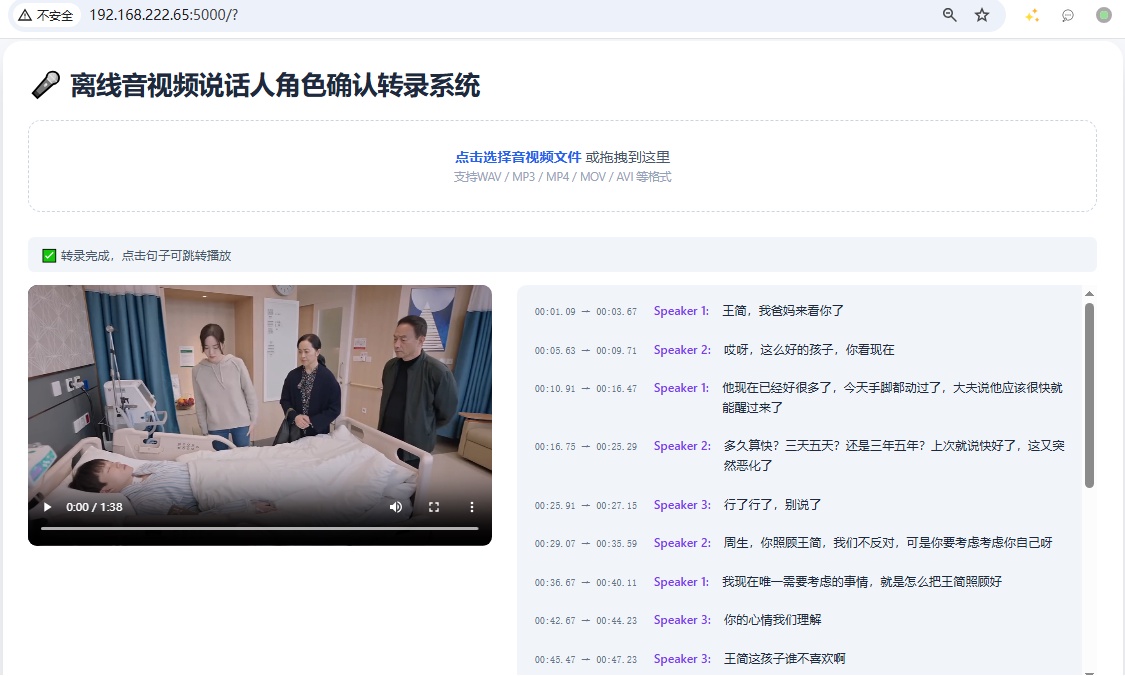
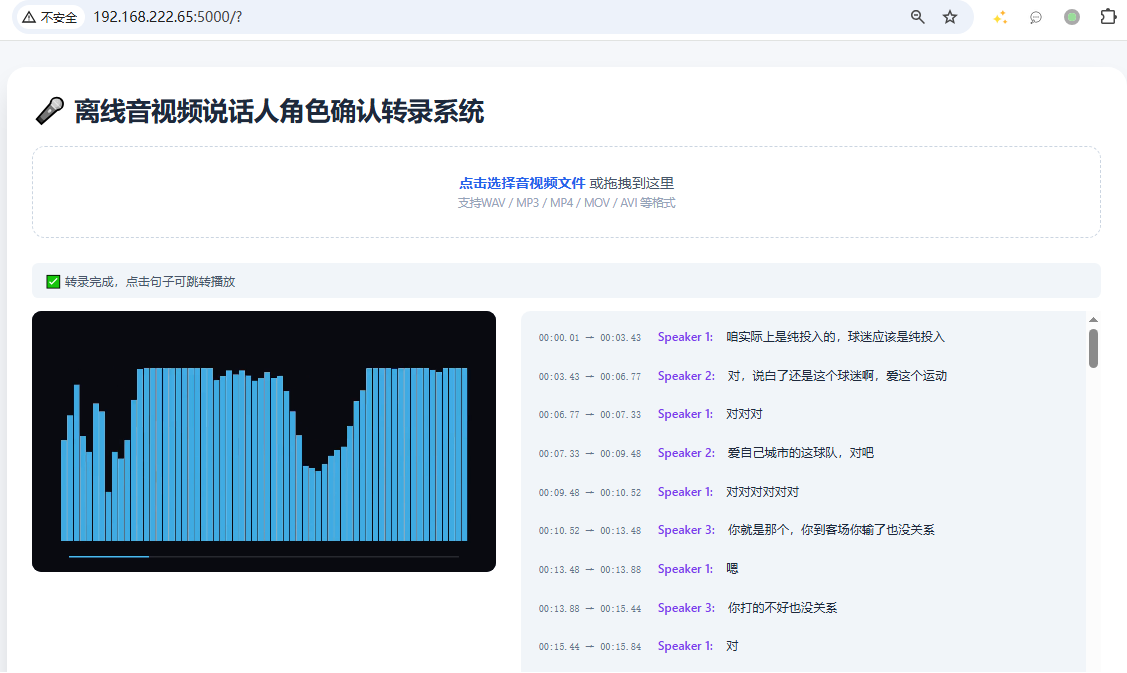
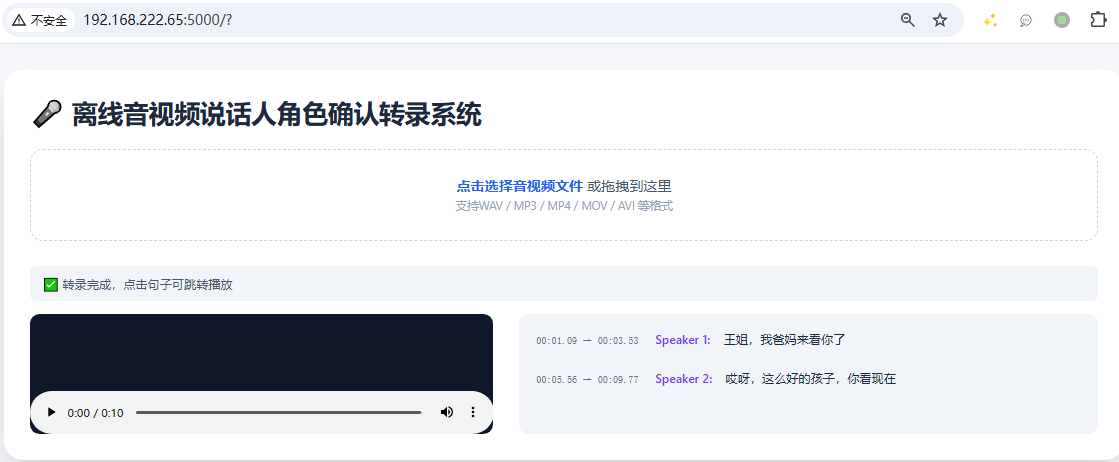
转录完成后,点击右边有时间段的文本记录,播放器会自动跳转到指定时间位置进行播放
全部评论(2)
只看楼主
木
7/13
瓜
干货
7/12
没有更多内容了
--
楼主

0 点赞
0 帖子
楼主热帖
 暂无数据
暂无数据常见问题新帖
暂无数据