llama-factory 这个是直接安装的吗,还是有适配 的版本
0
1
0
0
基于DCU KubeRay集群的LLaMA-Factory分布式微调
2025-03-10 15:24:38
678
1. 环境介绍
基础环境
| k8s-dcu-plugin | 定制版 |
|---|---|
| K8s | v1.28.6 |
| OS | Rocky Linux release 8.6 |
| DCU | K100_AI |
| CPU | Hg Genuine |
2. 部署步骤
2.1 部署kuberay-operator
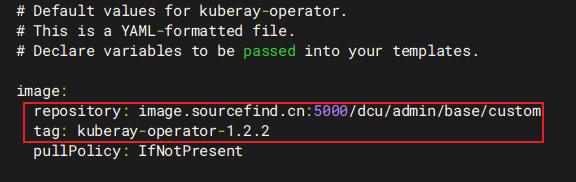
将kuberay项目代码(1.2.2版本)克隆到本地,进入helm-chart/kuberay-operator/values.yaml,修改image-repository和tag为适配hygon.com/dcu资源名称的镜像:image.sourcefind.cn:5000/dcu/admin/base/custom:kuberay-operator-1.2.2
在helm-chart目录下执行安装命令
helm install kuberay-operator kuberay-operator/ --namespace kuberay --create-namespace

kubectl -n kuberay get po
NAME                                READY   STATUS    RESTARTS   AGE
kuberay-operator-7fbdbf8c89-pt8bk   1/1     Running   0          27s
2.2 启动RayJob
2.2.1 准备模型
下载模型文件(本文使用DeepSeek-R1-Distill-Qwen-1.5B)保存至本地共享存储路径。本文将该路径挂载至容器内的/models路径。
2.2.2 准备微调数据集
按需准备相应格式的数据集,将其保存至本地共享存储路径。本文将该路径挂载至容器内的/llama-factory/data路径。注意确认dataset_info.json中标注的数据集文件和名称的对应关系,并将名称写入微调配置的“dataset”字段。
2.2.3 编排RayJob
下方编排文件可实现两个Pod分布式微调DeepSeek蒸馏模型,LLaMA-Factory配置文件使用了ConfigMap挂载。此外,需要注意的是,微调模型的输出目录需要具备写入权限。
apiVersion: ray.io/v1
kind: RayJob
metadata:
  name: sft-llama-factory
spec:
  entrypoint: USE_RAY=1 llamafactory-cli train config/train.yaml
  rayClusterSpec:
    headGroupSpec:
      rayStartParams:
        num-cpus: "8"
        dashboard-host: '0.0.0.0'
      template:
        spec:
          containers:
          - name: ray-head
            image: image.sourcefind.cn:5000/dcu/admin/base/custom:llamafactory-ubuntu22.04-dtk25.04-rc4-vllm0.6.6-py3.10
            lifecycle:
              preStop:
                exec:
                  command: [ "/bin/sh","-c","ray stop" ]
            resources:
              limits:
                hygon.com/dcu: "1"
                rdma/rdma_shared_devices_a: "1"
              requests:
                hygon.com/dcu: "1"
                rdma/rdma_shared_devices_a: "1"
            securityContext:
              capabilities:
                add: ["IPC_LOCK"]
            env:
            - name: NCCL_DEBUG
              value: "INFO"
            ports:
            - containerPort: 6379
              name: gcs-server
            - containerPort: 8265
              name: dashboard
            - containerPort: 10001
              name: client
            volumeMounts:
            - name: dshm
              mountPath: /dev/shm
            - name: hyhal-volume
              mountPath: /opt/hyhal
              readOnly: true
            - name: model-path
              mountPath: /models
            - name: config-path
              mountPath: /llama-factory/config
            - name: data-path
              mountPath: /llama-factory/data
            - name: save-path
              mountPath: /llama-factory/saves
          volumes:
          - name: dshm
            emptyDir:
              medium: Memory
          - name: hyhal-volume
            hostPath:
              path: /opt/hyhal
          - name: model-path
            hostPath:
              path: /public/model/
          - name: config-path
            configMap:
              name: config-files
          - name: data-path
            hostPath:
              path: /public/data/data_news_300/
          - name: save-path
            hostPath:
              path: /public/saves/
    workerGroupSpecs:
    - replicas: 1
      groupName: worker-group
      rayStartParams: {}
      template:
        spec:
          containers:
          - name: llm
            image: image.sourcefind.cn:5000/dcu/admin/base/custom:llamafactory-ubuntu22.04-dtk25.04-rc4-vllm0.6.6-py3.10
            lifecycle:
              preStop:
                exec:
                  command: [ "/bin/sh","-c","ray stop" ]
            resources:
              limits:
                rdma/rdma_shared_devices_a: "1"
                hygon.com/dcu: "1"
              requests:
                rdma/rdma_shared_devices_a: "1"
                hygon.com/dcu: "1"
            securityContext:
              capabilities:
                add: ["IPC_LOCK"]
            env:
            - name: NCCL_DEBUG
              value: "INFO"
            volumeMounts:
            - name: dshm
              mountPath: /dev/shm
            - name: hyhal-volume
              mountPath: /opt/hyhal
              readOnly: true
            - name: model-path
              mountPath: /models
            - name: config-path
              mountPath: /llama-factory/config
            - name: data-path
              mountPath: /llama-factory/data
            - name: save-path
              mountPath: /llama-factory/saves
          volumes:
          - name: dshm
            emptyDir:
              medium: Memory
          - name: hyhal-volume
            hostPath:
              path: /opt/hyhal
          - name: model-path
            hostPath:
              path: /public/model/
          - name: config-path
            configMap:
              name: config-files
          - name: data-path
            hostPath:
              path: /public/data/data_news_300/
          - name: save-path
            hostPath:
              path: /public/saves/
---
apiVersion: v1
kind: ConfigMap
metadata:
  name: config-files
data:
  train.yaml: |
    model_name_or_path: /models/DeepSeek-R1-Distill-Qwen-1.5B

    stage: sft
    do_train: true
    finetuning_type: lora
    lora_rank: 8
    lora_target: all
    lora_alpha: 16
    lora_dropout: 0
    loraplus_lr_ratio: 16

    dataset_dir: /llama-factory/data
    dataset: train
    template: deepseek3
    cutoff_len: 2048
    overwrite_cache: true
    preprocessing_num_workers: 16

    output_dir: /llama-factory/saves
    logging_steps: 10
    save_steps: 500
    overwrite_output_dir: true

    per_device_train_batch_size: 2
    gradient_accumulation_steps: 2
    max_grad_norm: 1.0
    learning_rate: 5.0e-6
    num_train_epochs: 3.0
    lr_scheduler_type: cosine
    warmup_ratio: 0.1
    packing: false
    bf16: true
    ddp_timeout: 1800
    trust_remote_code: true
    flash_attn: auto
    optim: adamw_torch

    val_size: 0.1
    per_device_eval_batch_size: 1
    eval_strategy: steps
    eval_steps: 500

    ray_run_name: ds_ray
    ray_num_workers: 2
    resources_per_worker:
      GPU: 1
    placement_strategy: PACK

  eval.yaml: |
    model_name_or_path: /models/DeepSeek-R1-Distill-Qwen-1.5B
    adapter_name_or_path: /llama-factory/saves

    stage: sft
    do_predict: true
    finetuning_type: lora

    dataset_dir: /llama-factory/data
    eval_dataset: eval
    template: deepseek3
    cutoff_len: 1024
    preprocessing_num_workers: 16

    output_dir: /llama-factory/saves
    predict_with_generate: true
    max_new_tokens: 512
    trust_remote_code: true
    per_device_eval_batch_size: 2
    temperature: 0.7
    top_p: 0.7
    flash_attn: auto
    quantization_method: bitsandbytes

    ray_run_name: ds_ray
    ray_num_workers: 2
    resources_per_worker:
      GPU: 1
    placement_strategy: PACK

  export.yaml: |
    model_name_or_path: /models/DeepSeek-R1-Distill-Qwen-1.5B
    adapter_name_or_path: /llama-factory/saves
    template: deepseek3
    trust_remote_code: true

    export_dir: /llama-factory/saves/output
    export_size: 5
    export_device: cpu
    export_legacy_format: false
llamafactory镜像为定制版,主要环境依赖描述:
| Ray | 2.42.0 |
|---|---|
| LLaMA-Factory | 0.9.2.dev0 |
| PyTorch | 2.4.1+das.opt1.dtk2504 |
| Ubuntu | 22.04 |
| DTK | 25.04 |
| Python | 3.10 |
2.2.4 启动任务
对上小节给出的编排文件执行kubectl apply命令以创建RayCluster和RayJob。
kubectl -n <YOUR-NAMESPACE> apply -f ray-job.llama-factory.sft.yaml
命令执行后,会产生RayCluster相关的Pod(在本文为一个head和一个worker)以及RayJob运行的Pod。

可通过RayJob运行Pod输出的日志查看训练进度。
kubectl -n <YOUR-NAMESPACE> logs <RAYJOB-POD-NAME> -f
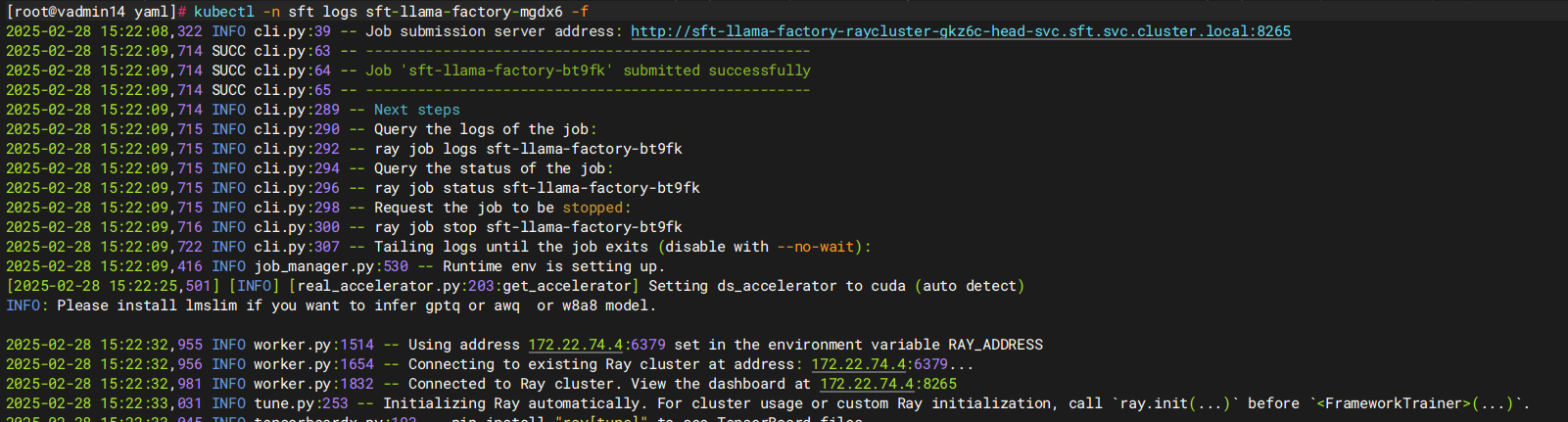
此外,还可以将Ray Dashboard端口转发到外部可访问的宿主机上,通过浏览器页面更直观地查看训练状态。
kubectl -n <YOUR-NAMESPACE> port-forward --address 0.0.0.0 svc/<YOUR-HEAD-SVC-NAME> 8265 &
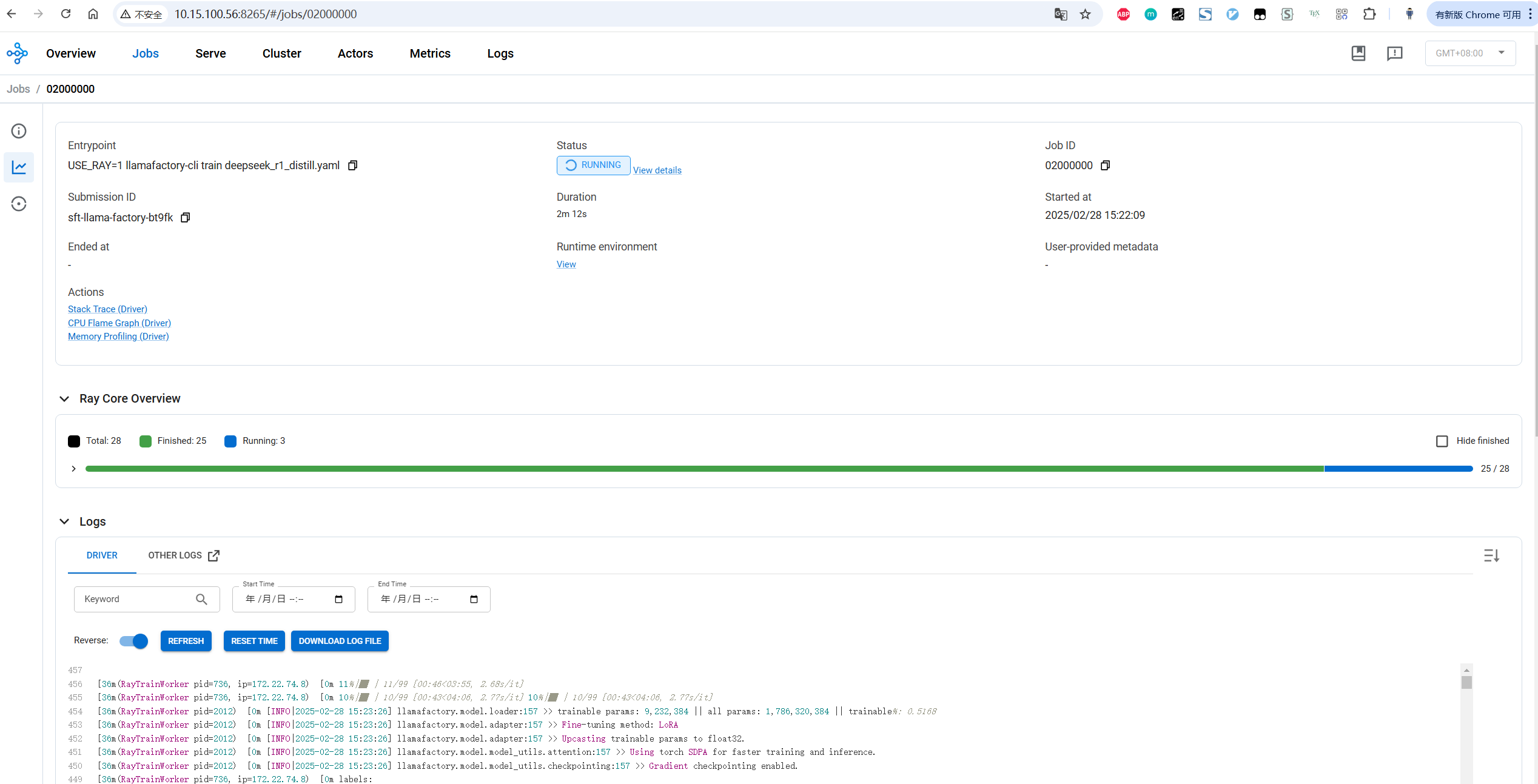
在微调过程中进入RayCluster的两个Pods,可观察到两个Pods中的DCU都提供了算力执行微调任务。
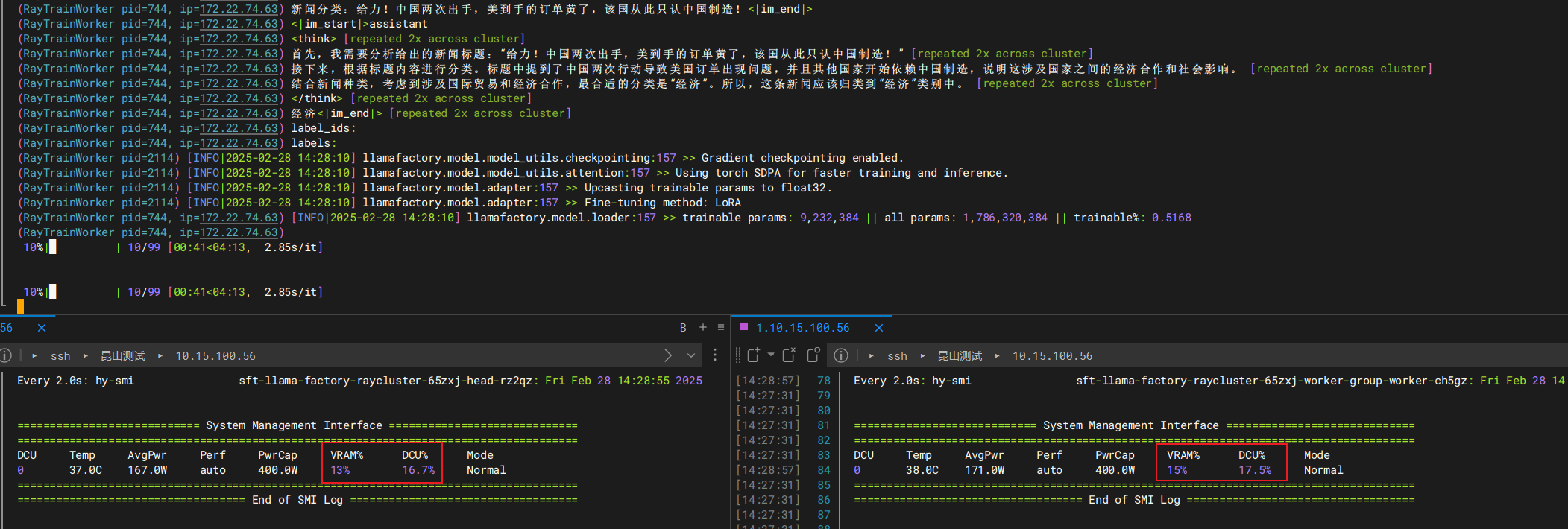
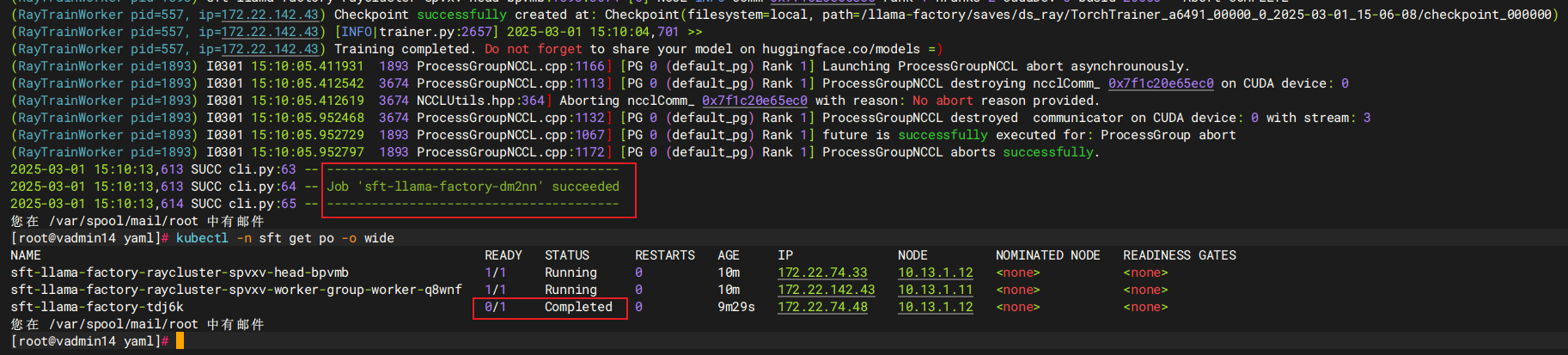
微调结束后,日志显示“Job xxx succeeded”,且RayJob Pod状态为Completed。此外,日志中会显示训练和验证相关数据,该数据也可在saves目录下的all_results.json文件中查看。
3. 模型评估
在2.2.3小节给出的编排文件中,已挂载了eval.yaml文件在config目录下用于评估和预测微调后的模型。使用2.2.4小节微调任务的RayCluster继续执行评估任务。RayCluster名称可通过下面命令查看。
kubectl -n <YOUR-NAMESPACE> get rayclusters.ray.io

将RayCluster名称写入如下编排文件中,执行kubectl apply命令启动微调模型的评估任务。
apiVersion: ray.io/v1
kind: RayJob
metadata:
  name: eval-llama-factory
spec:
  entrypoint: USE_RAY=1 llamafactory-cli train config/eval.yaml
  clusterSelector:
    ray.io/cluster: sft-llama-factory-raycluster-8kb8v
命令执行后,会启动一个新的Pod。查看其日志以观察评估进度。

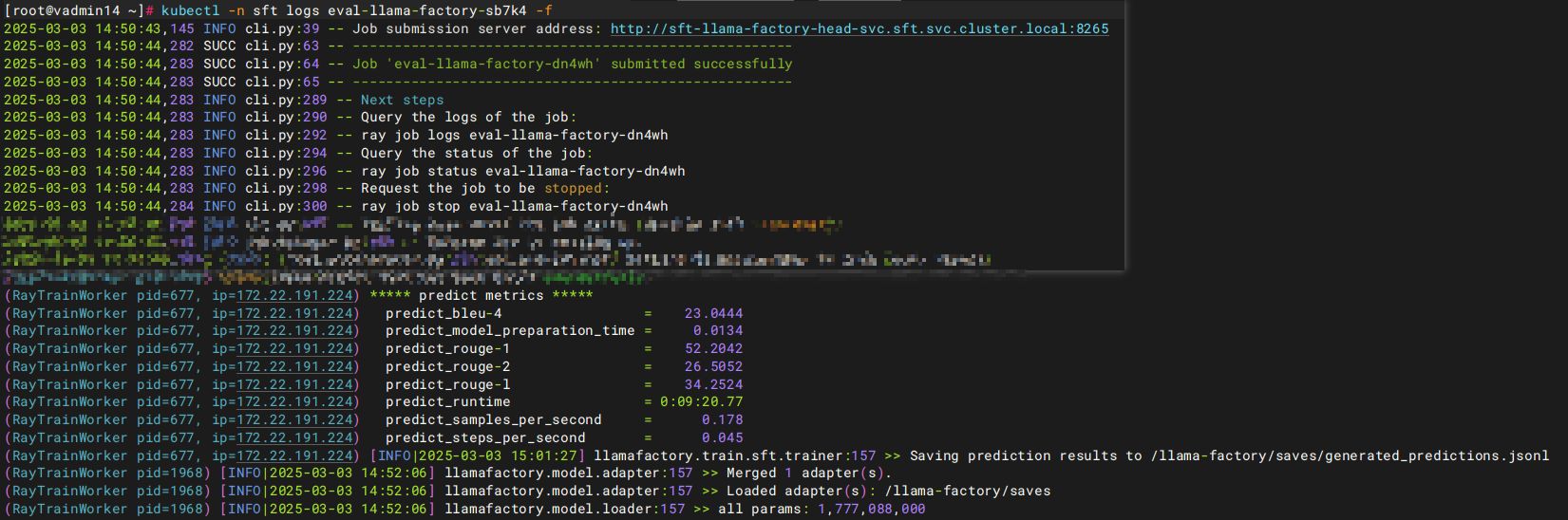
模型评估完成后会显示测试集的分数。其中ROUGE分数衡量了模型输出答案(predict)和测试集中标准答案(label)的相似度,ROUGE分数越高代表模型学习得更好。测试集分数也可以在saves目录下的predict_results.json或all_results.json中查看。
4. 模型合并
在2.2.3小节给出的编排文件中,已挂载了export.yaml在config目录下用于合并微调后的模型。使用2.2.4小节微调任务的RayCluster继续执行合并任务。将RayCluster名称写入如下编排文件中,执行kubectl apply命令启动微调模型合并任务。
apiVersion: ray.io/v1
kind: RayJob
metadata:
  name: export-llama-factory
spec:
  entrypoint: llamafactory-cli export config/export.yaml
  clusterSelector:
    ray.io/cluster: sft-llama-factory-raycluster-8kb8v
任务执行完毕后,可在2.2.3小节编排文件config-export ConfigMap中export_dir指定的容器目录(本文使用saves/output)内查看和使用完整模型。
全部评论(2)
只看楼主
网
2025/5/30
没有更多内容了
--
楼主

0 点赞
0 帖子
楼主热帖
 暂无数据
暂无数据常见问题新帖
暂无数据