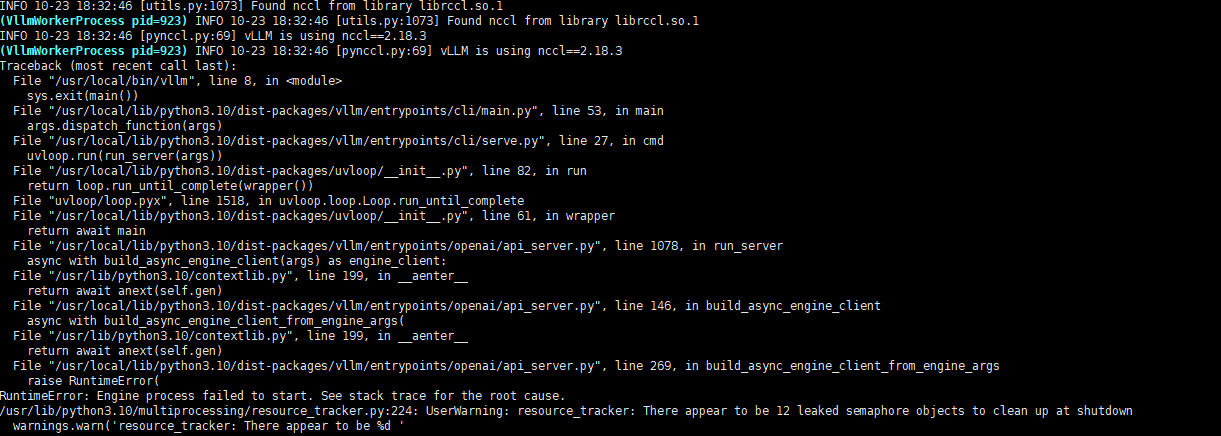
您好,我这边复现了下是可以正常起服务的。您可以添加下 --disable-custom-all-reduce 参数试试能否正常跑通。另外可以检查下模型文件是否完整,以及启动服务时CPU内存和DCU显存的占用情况。下面是正常运行的log日志部分截图。
0
2
0
0
k100启动qwq32b模型报错
2025-10-23 18:40:49
217
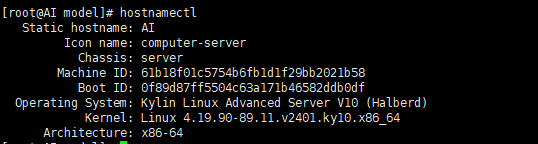
操作系统:
使用的镜像:image.sourcefind.cn:5000/dcu/admin/base/vllm:0.8.5-ubuntu22.04-dtk25.04.1-rc5-das1.6-py3.10-20250724
启动命令:
root@AI:/mode# cat start_qwq32b.sh
#!/bin/bash
export HIP_VISIBLE_DEVICES=0,1,2,3
log_path="QwQ-32B.log"
port=8009
model_name="qwq_32"
gpu_count=4
api_key="sk-f6s8h3ud73hd832hfd823j48fd8"
max_len=40960
vllm serve QwQ-32B/
--tensor-parallel-size $gpu_count
--trust-remote-code
--port $port
--max-model-len $max_len
--served-model-name $model_name
--api-key $api_key
--enforce-eager
--enable-auto-tool-choice --tool-call-parser hermes
--gpu-memory-utilization 0.95 > $log_path 2>&1 &
全部评论(1)
只看楼主
Z
2025/10/30
没有更多内容了
--
楼主

0 点赞
0 帖子
楼主热帖
 暂无数据
暂无数据常见问题新帖
暂无数据